Schedule Reports and Checks
A useful one-off report can become a regular digest. For example, run a weekly project-cost review, prepare a morning list of inactive users with project assignments, or compare project permissions with the previous saved snapshot.
The integration you build owns the schedule. Connecting MCP does not itself create a background job, save historical snapshots, or deliver messages. An unattended run needs a scheduler, a runtime with access to Requidex, persistent storage where needed, and a separately configured destination. If using an AI service's scheduling feature, first verify that it can use your Requidex connection during unattended runs.
Example: a daily access-change digest
Build a read-only scheduled job against the Requidex Open API for company
<company-id>. Run daily at 08:00 Europe/London using a scheduler I configure.

Fetch every page of user assignments and user permissions, including
inactive users. Save a timestamped snapshot for this company. Compare it
with the last complete snapshot using user, project, and permission ids.
Report added/removed project assignments, changed granted values, and
account status changes. Flag inactive users with remaining assignments.

On the first run, save a baseline without claiming any changes. If a fetch
fails, retain the last complete baseline and mark the run incomplete.
Keep the API key in server-side secret storage. Generate a draft digest;
leave delivery disabled until recipients and credentials are configured.
Use the company-only user assignments and user permissions routes with read:users. Keep a separate baseline for each company and filter set. Changing filters can change results without any underlying access change.
Snapshots tell you that a difference was observed between two retrievals. They do not establish who made the change or its exact time. Collect all pages for a run, but do not assume multiple API requests form a transactionally consistent database snapshot.
Example: a weekly operational brief
Ask a coding assistant to turn the monthly report specification into a weekly job. Fix the timezone and reporting period, calculate totals deterministically, then use an AI service to draft an explanation of those totals. Keep the output period and source counts visible, and give repeated runs a stable period identifier to avoid duplicate delivery.
The scheduler might be your existing automation platform or a hosted scheduled task. Its hosting, credentials, retry policy, and delivery channels are part of your integration—not provided by the Requidex MCP server.
Example: an assignment-ending reminder
Cadence: every weekday morning. Output: a project-by-project planning list.
Build a scheduled check for confirmed worker assignments ending in the
next seven calendar days for company <company-id>. Run at 07:30
Europe/London on weekdays and resolve the date window at run time.

Use dateField=endDate. Include assignment id, reference, project, trade,
and end date. Store the assignment id and last reported end date so an
unchanged assignment isn't announced as newly ending on every run.

If an end date changes, show the old and new dates from our saved records.
Re-check the current record before delivery. Prepare a draft for the
configured project recipients; do not end, extend, or replace assignments.
Use assignments with read:assignments. Hirers and agencies can monitor their accessible records. A scheduled end date is a planning signal, not proof that the worker has left. Store reminder state separately from Requidex, and distinguish an assignment leaving the date window from an assignment being cancelled.
Example: a morning timesheet follow-up queue
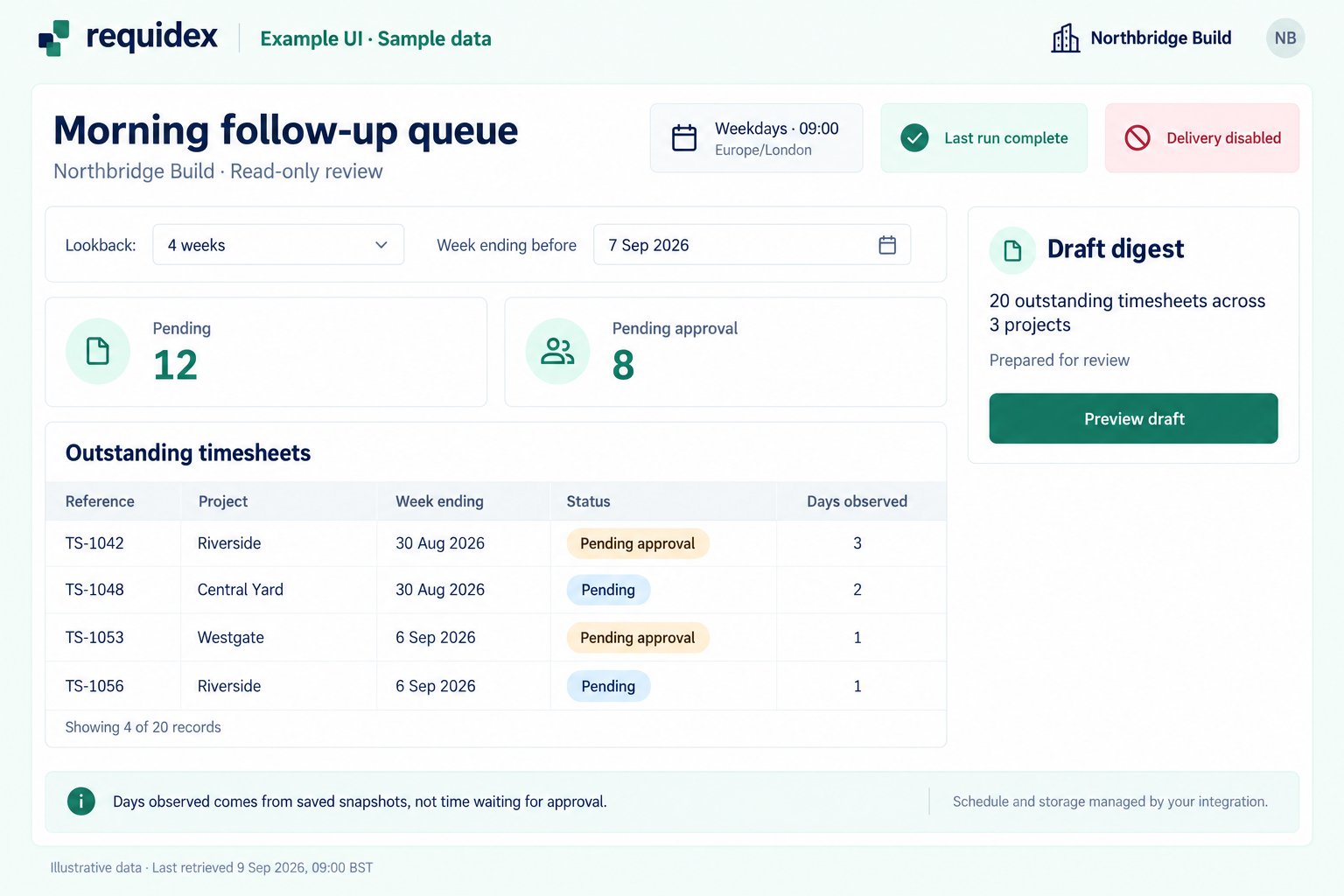
Illustrative custom UI with sample data. Your integration supplies the schedule, saved snapshots, and draft digest. Days observed is not time waiting for approval; the queue only covers the configured lookback period.
Cadence: each working morning. Output: outstanding timesheets grouped by project and status.
At 09:00 Europe/London each weekday, collect pending and pending_approval
timesheets for company <company-id> whose week-ending date is before the
current week. Configure an explicit lookback period and print it on the
report. Fetch each status separately and deduplicate by timesheet id.

Group by project and status, then show the record ids and week-ending
dates. Use saved snapshots to distinguish new entries from entries still
outstanding. Call any duration 'days observed in this queue', not the
time spent waiting for approval.

Only mark an entry resolved after re-reading it and confirming the new
status. A failed request or a record outside our access is not resolution.
Generate a draft follow-up list for configured recipients.
Use timesheets with read:timesheets. A lookback-limited queue is not a complete historical backlog. Delivery to an email or messaging service needs its own integration; Requidex MCP does not send these reminders.
Example: a weekly purchase order review
Cadence: Monday morning. Output: orders approaching their end date, with a separate missing-date list.
Every Monday at 08:30 Europe/London, review active purchase orders for
company <company-id>. List orders ending within the next 30 calendar days,
with id, reference, project, value, and end date. Put orders without an
end date in a separate section.

Save the report date and source ids. Remember which order/end-date pairs
have already been reported, and highlight changed dates separately.
Show the order value as its stated value, not remaining budget.
Prepare a review digest without renewing or changing any order.
Use purchase orders with company-scoped read:purchase-orders. Agency keys cannot use this endpoint. Select and store the review windows in your integration so repeated runs use the same rules.
Example: a weekly expense-change check
Cadence: weekly, comparing two complete reporting weeks. Output: changes exceeding your team's configured review thresholds.
Build a weekly expense review for company <company-id>. Compare the last
two complete Monday-to-Sunday weeks using expense date and the same
configured approval-status filter. Group values by project and category.

Flag a group only when both its absolute increase and percentage increase
exceed thresholds that I configure. Ask for the thresholds and currency;
do not invent them. Handle a zero prior-period value as a separate case.

Store the periods, thresholds, totals, and source filters for each run.
Generate one draft per reporting period, with revisions labelled if late
records change the results. Describe flags as review candidates, not errors.
Use the expense summary API at GET /expenses/summary, or summarize_expenses in a runtime with MCP access. Expense records require read:timesheets. Keep comparison currencies and date boundaries consistent. The scheduler must explicitly support any AI or MCP calls used during the run.
Example: a monthly invoice pack with revisions
Cadence: the first day of each month, followed by a configured recheck. Output: a versioned report for the previous calendar month.
Generate an invoice pack for company <company-id> on the first day of
each month at 08:00 Europe/London, using the previous calendar month's
issue dates. Keep invoice types and statuses separate.

Save the selected invoices, totals, filters, and retrieval timestamp as
version 1. Re-run for the same issue-date period seven days later. Compare
records by id and publish a labelled revision only if the results change.
Describe additions, removals, and changed values as observed differences.

If access changes or collection is incomplete, stop the comparison and
retain the last complete version. Generate the report for review without
claiming it is a closed accounting period or proof of payment.
Use invoices with read:invoices. A later retrieval may include backdated records or changed statuses. Keep the same billing basis across versions, and follow the bespoke report guidance to avoid combining invoice flows that represent different sides of the same transaction.
When events are a better trigger
Our Using Webhooks help guide explains where to configure webhooks in Requidex and how to use event payloads.
For supported requisition, assignment, and timesheet events, webhooks can trigger a workflow instead of waiting for the next scheduled poll. Use the documented event payload and re-read relevant records when necessary.
User membership and permission changes are not among the documented webhook events. Use saved snapshots for those comparisons. Follow the webhook reference's subscription and caller restrictions.
Handle incomplete runs explicitly
Respect rate limits, retry temporary failures with backoff, and distinguish an empty result from a failed request. A 401 or 403 should stop the run for investigation rather than produce a report saying there is no data. Keep an execution log and only replace a baseline after a complete successful collection.