Create Bespoke Reports
Describe the decisions your report should support, then specify its columns and calculations. You can request a one-off output in an AI client with suitable file tools, or ask a coding assistant to build a reusable report generator against the Open API.
Before trying the prompts, follow our ChatGPT connection guide or Claude and Cowork connection guide.
A monthly project management pack
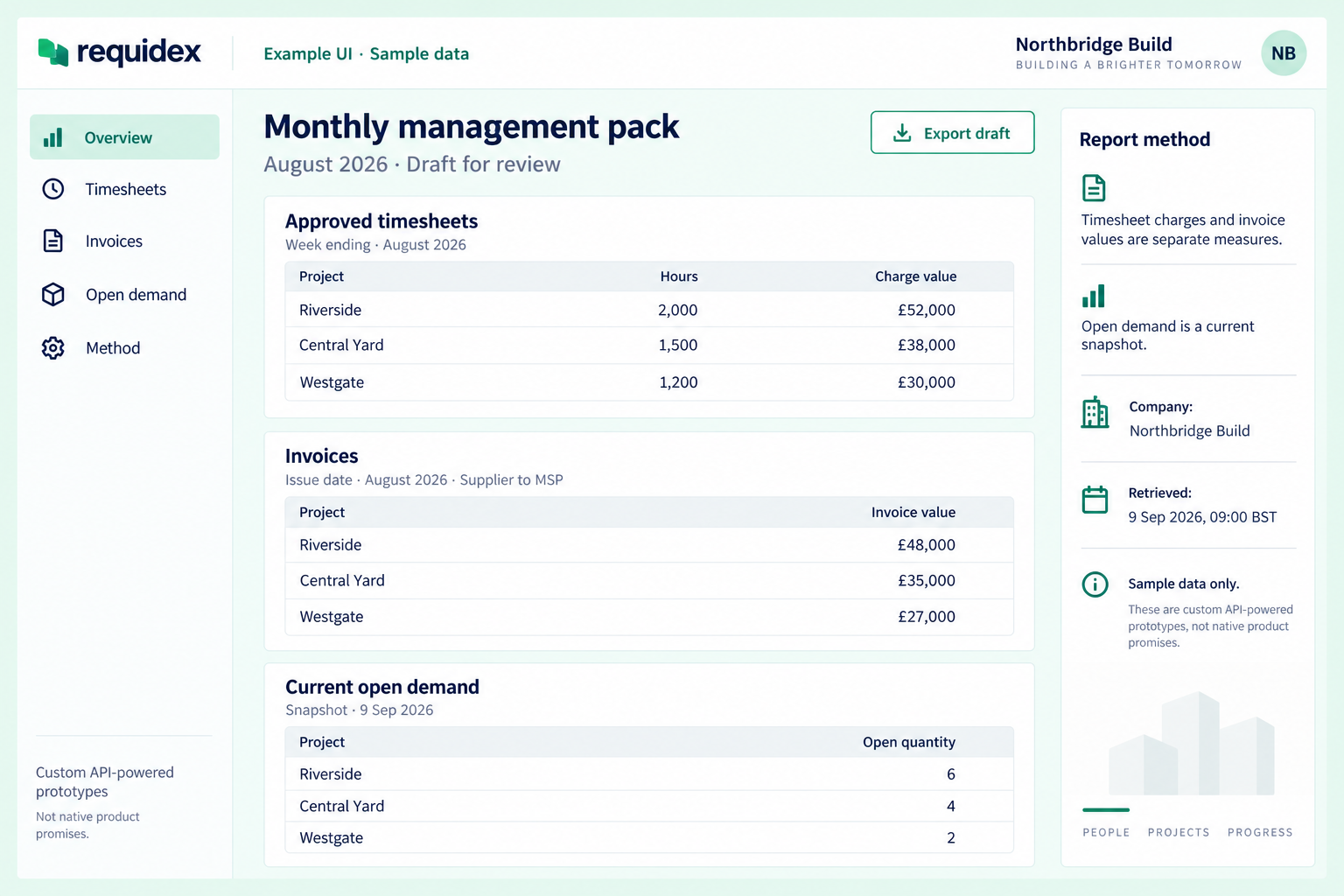
Illustrative custom UI with sample data. Timesheet charges and invoice values remain separate, and open demand is labelled as a current snapshot. Exporting a draft requires your report generator.
Useful for: hirers comparing activity and invoicing across their projects.
Output: a concise executive summary plus separate tables for timesheets, invoices, and open demand.
Create a monthly management pack for Northbridge Build for August 2026.
Use Requidex and produce three separate tables:
1. Approved timesheet hours and charge value by project, using week ending.
2. Invoice totals by project and status, using invoice issue date.
3. Current open requisition quantity by project and trade, labelled with
   today's retrieval date rather than presented as August history.

Use summary tools where available. Keep timesheet charges and invoice
totals separate; do not add them together. Define each measure and date
basis, and identify missing or inaccessible data. Add five short findings
with their supporting numbers. Draft the report for review.
Relevant MCP tools include summarize_timesheets, summarize_invoices, and summarize_requisitions. API keys need the corresponding read:timesheets, read:invoices, and read:requisitions scopes. See the timesheet, invoice, and requisition references for available fields and access rules.
A company access-review workbook
Build a workbook from Requidex user assignments and user permissions for
Northbridge Build. Include these sheets:
- Users: user id, name, role, active/inactive status, assigned project count
- Assignments: one row per user/project pair, with both ids and names
- Permissions: one row per user/project/permission rule and its granted value
- Review: inactive users with assignments, with a reason for each row
- Method: company id, retrieval timestamp, filters, and coverage limitations

Fetch every page before calculating counts. Keep only projects returned
for this company. Explain that permission rules are not a complete list
of user capabilities. If file creation isn't available, provide the tables
or a script that produces the workbook.
Requires company-scoped read:users. Both user endpoints paginate by user; expand project arrays only after collecting the required pages. Use a direct API report generator if the data exceeds the MCP retrieval cap.
A weekly agency client-service report
Useful for: agencies preparing a consistent update for each client company.
Output: a client summary with supporting sheets for worker assignments, approved timesheets, and open requirements.
Create a weekly client-service report from the Requidex records available
to my agency for the week ending 6 September 2026.

Include:
- Approved timesheet hours and charge values by client and project,
  using week ending as the date basis
- Confirmed worker assignments scheduled to end in the following 14 days
- Current open requisition quantity visible to this agency
- A short list of follow-up questions for our account managers

Keep each client's section separate. Label current snapshots separately
from the reporting week's activity. Include source ids and definitions.
Do not describe our accessible data as the client's entire workforce.
Produce a draft document plus the supporting tables, without sending it.
Use timesheets, assignments, and requisitions, with read:timesheets, read:assignments, and read:requisitions. For agency consumers, use an agency-scoped API key and supported endpoints; Requidex's company-admin OAuth connection is not an agency sign-in route.
A timesheet approval follow-up pack
Useful for: hirers reviewing outstanding approvals, or agencies tracking the status of their accessible timesheets.
Output: a summary by project and status, with a detailed follow-up register.
Build a timesheet follow-up workbook for Northbridge Build, covering
week-ending dates in August 2026. Use the records' current status.

Create a Summary sheet with counts and reported charge values by project
and status. Create a Follow-up sheet for pending and pending_approval
timesheets, with id, reference, project, agency, week ending, status,
and days since week ending as of the retrieval date.

Keep pending and pending_approval separate. Show any returned approver
information only where the API supplies it. Label days since week ending
accurately; it is not time spent waiting for approval. Add a Method sheet
with filters, retrieval time, record counts, and missing data.
Use timesheets with read:timesheets. Summary tools can provide grouped totals; retrieve detail rows for the follow-up sheet. Current statuses do not reconstruct the approval backlog as it existed at the end of August.
A purchase order renewal register
Useful for: hirers coordinating purchase order reviews across projects.
Output: a sortable workbook of active purchase orders and upcoming end dates.
Create a purchase order review register for Northbridge Build as of
1 September 2026. List active purchase orders with their id, reference,
project, value, start date, and end date where available.

Create three sheets: All active orders; Orders ending during September;
and Orders with no end date. Include a days-to-end calculation relative
to the stated report date and a blank Review notes column for the team.

Do not interpret the order value as remaining budget or calculate a
remaining balance without a defined, complete consumption measure.
Include source ids, retrieval time, and the report's date assumptions.
Use purchase orders with company-scoped read:purchase-orders. This endpoint is not available to agency keys. The report is a review register; it does not renew orders or establish whether further work is authorised.
An invoice and credit-note review workbook
Useful for: finance teams checking the relationship between invoices and their documented adjustments.
Output: separate invoice and credit-note registers, with linked records and unmatched items for review.
Create an invoice and credit-note review workbook for Northbridge Build.
Select invoices issued in August 2026, keeping billing flow types separate.

Create an Invoices sheet and a Credit notes sheet. Match accessible
credit notes to the selected invoices using the returned invoice id,
including notes created after August. State the credit-note retrieval
cut-off. Show reference, type, status, available totals, and reason.

Put records without a usable invoice link in a separate review sheet.
Do not join on similar reference text or assume a missing credit note
means no adjustment exists. Keep original invoice values and credit-note
values separate unless their sign and amount definitions are confirmed.
Do not describe the report as proof of payment or an accounts balance.
Use invoices and credit notes with read:invoices and read:credit-notes. Credit notes can include an invoice id and reference. A complete match requires sufficient access and complete retrieval of the relevant records, potentially through a direct API export rather than MCP.
A recruitment performance pack
Useful for: eligible hirers preparing a regular agency or project performance review.
Output: a presentation-ready summary and a supporting metrics table with sample sizes.
Create a recruitment performance pack for Northbridge Build comparing
July and August 2026. First check that recruitment metrics are available.

Use metric=timeToFill grouped by agency and project. Include medianDays,
averageDays, included count, rawCount, and excludedOutliers. Prepare a
summary page, a comparison table, and a methodology page describing the
date basis and outlier treatment. Identify small samples clearly.

Suggest discussion questions supported by the numbers. Do not turn
different averages into an overall supplier score or assume the time
measure runs through to the worker's first day on site. If presentation
creation is unavailable, provide slide-ready headings and tables.
Use recruitment metrics with company-scoped read:requisitions. The company must have stage tracking enabled. For timeToFill, the period uses supplier accepted date and the measure runs from approved date to supplier accepted date, with the endpoint's per-group IQR outlier handling.
Make a report repeatable
Save the chosen company ids, date basis, statuses, metric definitions, and output columns as a report specification. Join by stable ids, calculate totals in code, and record the retrieval time. A report built from incomplete pages should be labelled incomplete, not published as a full-company total.
For agency reports, use supported records within the agency key's access. Company-only user reports are not available to agency keys. For unattended generation, continue to scheduled workflows.