Build Custom UIs
Build an interface around a specific review or decision: a user-to-project matrix, a permissions explorer, or a project activity dashboard. An AI coding assistant can help turn that idea into a prototype and then connect it to the Open API.
Example: an access-review workspace
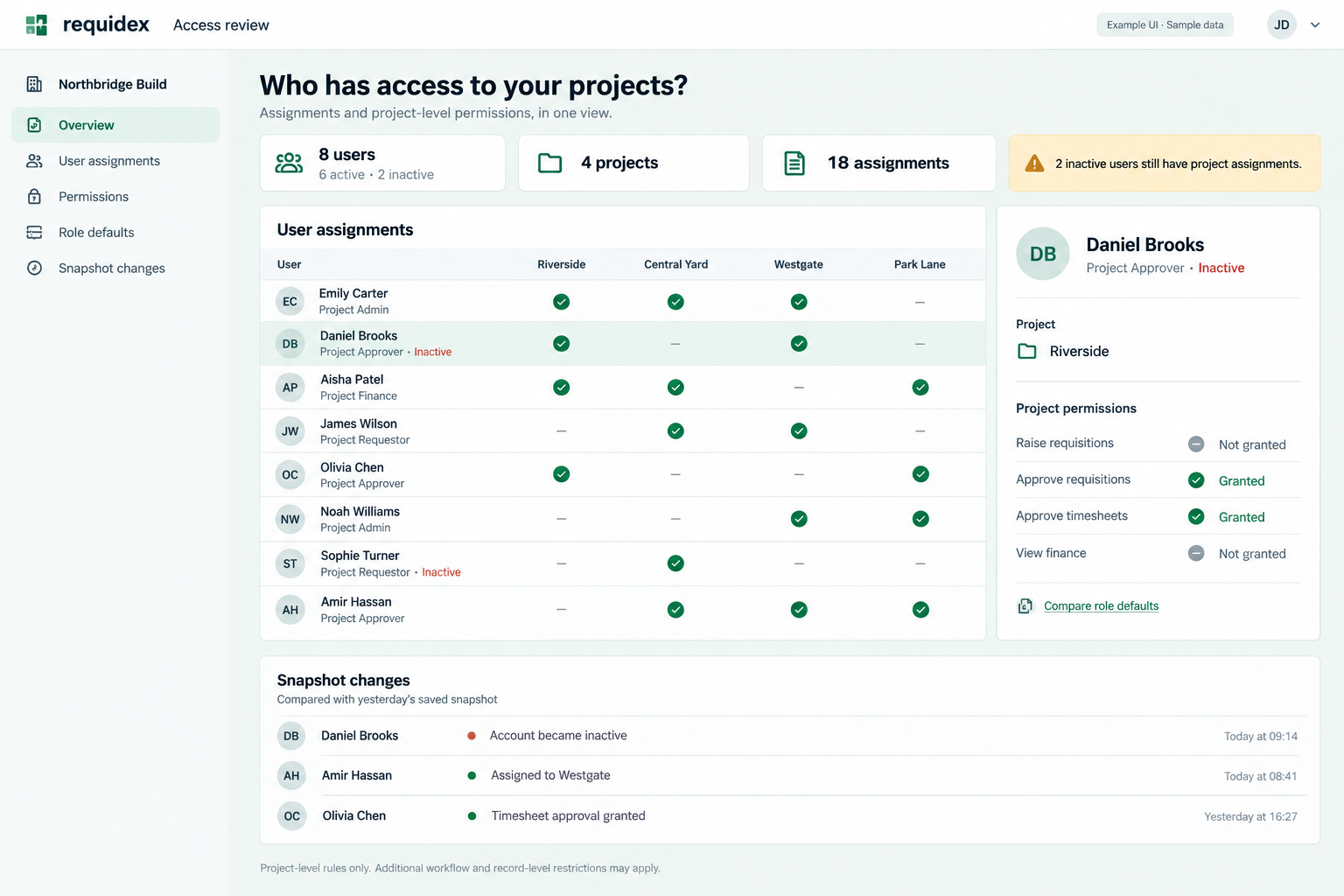
Illustrative UI with sample data, not a built-in Requidex screen. The changes panel requires snapshots collected and stored by your application. Times shown in a monitoring interface should describe when a change was observed, rather than imply an exact audit-event timestamp.
This workspace brings three sources together:
| View | Source | What it helps someone review |
|---|---|---|
| User-to-project matrix | User assignments | Membership, active/inactive users, and assignment counts |
| Selected-user permissions | User permissions | Reported project-level grants for one user and project |
| Role-default reference | Access rule mappings | Default actions grouped by role or rule |
| Changes since last review | Your application's saved snapshots | Observed assignment, account-status, and permission differences |
For connected development, follow our Codex setup guide or Claude Code setup guide.
Try this build prompt
Build a read-only access-review dashboard using the Requidex Open API.
Start with clearly labelled sample data, then add a server-side adapter
for the documented endpoints.

Use a company selector restricted to the signed-in viewer's access.
Show a user-by-project assignment matrix and active/inactive filtering.
Selecting a user/project cell opens that user's reported permission rules.
Add a separate role-default view with optional role or rule grouping.

Fetch every required page, join by ids, and show the last successful
retrieval time. Keep each company's responses and cache entries separate.
Only show projects returned by the selected company's user endpoints.
Distinguish missing data, failed requests, and permissions not granted.

Keep API credentials on the server and enforce viewer access there.
Make it responsive and keyboard-accessible. No permission-edit controls.
Explain that project-level rules do not represent every action a user can
perform. Add snapshot comparisons only after persistent storage exists.
User reports need company-scoped read:users; role-default mappings require a valid company-scoped key with no additional resource scope. A backend key's access is not a substitute for authorising each person who uses your custom UI.
More interface examples
Explore three more mockups alongside their scenario prompts:
- Project cost review: compare monthly timesheet charge values by project and inspect the largest movements
- Monthly management pack: preview separate timesheet, invoice, and current-demand tables with their reporting methods
- Morning timesheet follow-up queue: review outstanding records and a draft digest from a scheduled integration
All examples use fictional sample data. Hirers can adapt them to their accessible projects; agencies can adapt the cost and timesheet views to their own accessible records and use the agency client-service report as their reporting basis.
From prototype to a working tool
Use sample data to agree the interaction first. Replace it with authenticated server-side API calls, validate pagination and company isolation, and display errors and stale data clearly. Keep credentials out of frontend code, generated screenshots, and prompts.
An MCP connection helps an assistant inspect and analyse data while building. It does not automatically give a deployed browser application an authenticated connection. The deployed application needs its own backend integration and user access checks.
For monitoring, use the scheduled workflow pattern. For a narrower first version, ship the assignment matrix and permission detail panel before adding stored history.