Analyse Your Data
Start with a business question and let the assistant find the relevant Requidex records, calculate a comparison, and explain the result. Keep the underlying numbers and record identifiers alongside the narrative so someone can check the conclusion.
Before trying the prompts, follow our ChatGPT connection guide or Claude and Cowork connection guide.
Compare hours and costs across projects
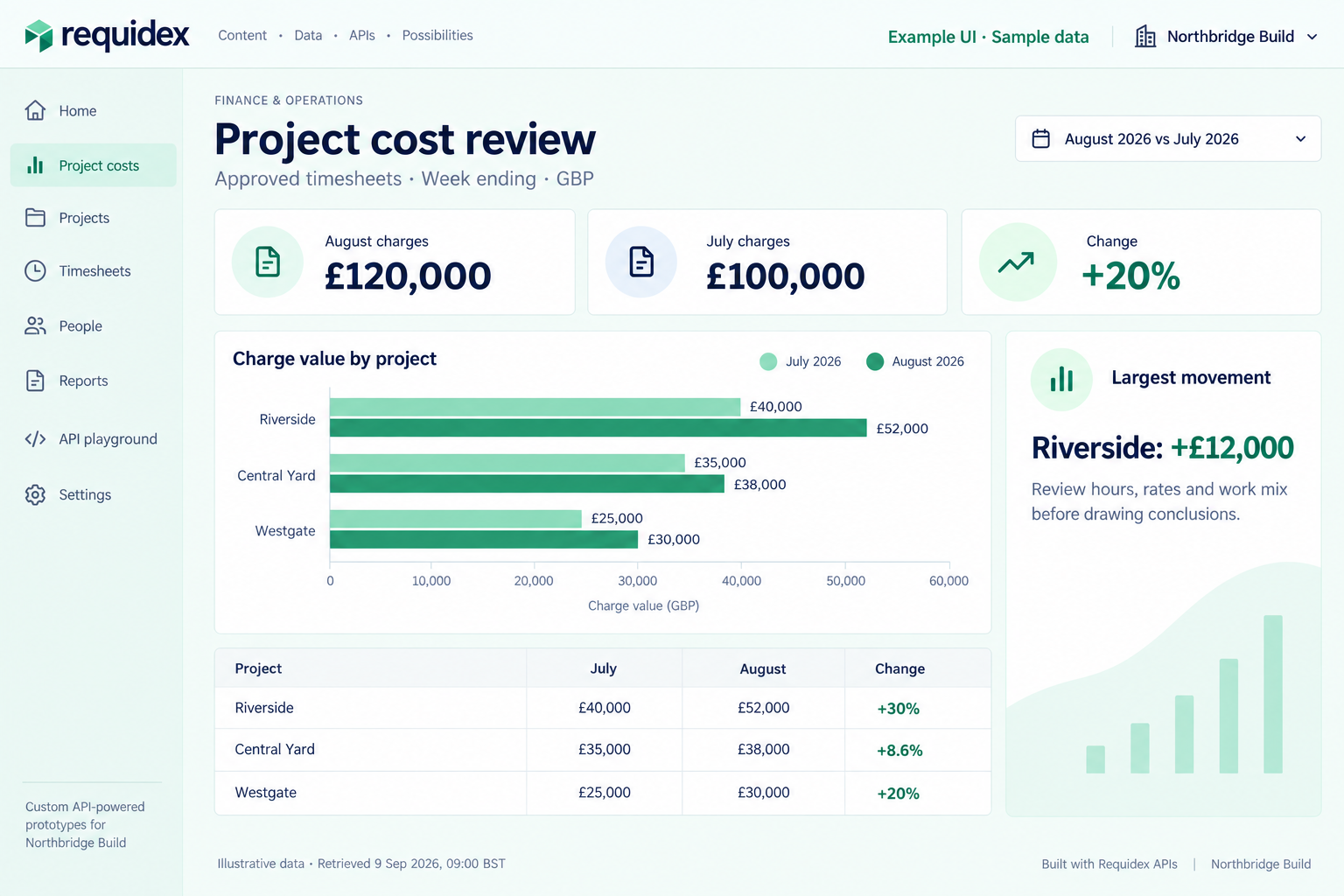
Illustrative custom UI with sample data. This view compares approved timesheet charge values using week ending; it does not show payments or establish why costs changed.
Useful for: hirers reviewing project activity, or agencies analysing their own accessible timesheets.
Output: a ranked table of projects, a comparison chart, and a short explanation of the largest movements.
Using Requidex, compare approved timesheet hours and charge values for
Northbridge Build in August 2026 versus July 2026, grouped by project.
Use week ending as the date basis. Resolve the company name first.

Use summarize_timesheets for the totals. Show absolute and percentage
changes, keeping hours and currency separate. Where the previous value
is zero, show the percentage change as not applicable.

List the five biggest charge increases. Separate observed changes from
possible explanations; don't invent causes. Include the filters,
retrieval time, and source project ids.
The summarize_timesheets MCP tool supports project grouping and measures such as hours, net hours, charge value, and pay value. Confirm the chosen hour measure: gross and net hours are different. Drill into timesheet records only when the comparison needs supporting detail. API-key access requires read:timesheets.
See where demand is still unfilled
Use Requidex to summarise open requisition quantity for Northbridge Build
by project and trade. Rank the ten largest outstanding requirements.
Use summarize_requisitions and its openQuantity measure.

Show project, trade, requested quantity, assigned quantity, and open
quantity. Identify the records behind the top three rows. Treat this
as a current snapshot, not a historical trend.
Use requisitions and read:requisitions. The open status means approved, active, and unfilled demand. Agency access remains limited to permitted requisitions; an inaccessible record is not evidence that demand does not exist.
Understand your agency spend mix
Useful for: hirers reviewing how invoice value is distributed across agencies and projects.
Output: a ranked agency breakdown and each agency's share of the selected invoice total.
Use Requidex to analyse Northbridge Build's invoice values for August
2026, using issue date. First identify the invoice types and statuses
available, and ask which billing basis I want to compare.

Use summarize_invoices grouped by agency and project. Show each agency's
total and share of the selected billing basis. Identify projects where
one agency accounts for most of that value. Keep invoice types separate
so supplier-to-MSP and MSP-to-client invoices aren't double-counted.

Include source ids and the selected filters. Describe concentration in
the observed data without treating it as proof of supplier risk.
Use invoices with read:invoices. Invoice value is not the same as cash paid or timesheet cost. Agencies can use the same approach for their own accessible invoices, but cannot infer other agencies' market share from a restricted dataset.
Prepare for upcoming assignment endings
Output: a project-and-trade breakdown of confirmed assignments due to end, with records for follow-up.
For Northbridge Build, find confirmed worker assignments with endDate
between 14 and 27 September 2026. Use the end date filter, not created date.

Group the results by project and trade. Show assignment counts and
distinct worker counts separately, then list the underlying assignment
ids, references, and end dates. Fetch all required pages before counting.

Highlight the largest groups for a planning review. Don't assume an
ending assignment needs a replacement or that a worker is leaving the
company. If there are too many records for MCP, narrow the date range.
Use assignments with read:assignments, status=confirmed, and dateField=endDate. These are worker assignments, distinct from the user-to-project memberships returned by the user assignments endpoint. Both hirers and agencies can review records within their access.
Break down overtime and out-of-hours charges
Output: a project comparison showing which charge components changed between periods.
Compare approved timesheets for Northbridge Build in July and August
2026, using week ending. Use summarize_timesheets grouped by project.

Show chargeWdBasic, chargeWdOvertime, chargeNightwork, chargeWeekend,
and chargeBankHoliday separately. Rank projects by the increase in
weekday overtime charge and show the absolute change in each component.

Do not describe charge values as hours. Don't sum overlapping components
or claim they reconcile to chargeValue unless the documented definitions
support that. Explain possible follow-up questions, not assumed causes.
Use timesheets and read:timesheets. This can help hirers examine project cost patterns and agencies review their own activity. A larger charge can reflect rates, hours, or the mix of work; the summary alone does not establish the cause.
Find expense categories worth reviewing
Output: category totals, month-to-month movements, and a short list of supporting expense records.
Analyse Requidex expenses for Northbridge Build in July and August 2026,
using expense date and the same approval-status filter in both periods.
Check the supported statuses before choosing the filter.

Use summarize_expenses grouped by project and category. Show value and
record count for each group, plus the change between months. For the
largest increases, retrieve a small set of supporting expense records
with ids, dates, categories, and values.

Keep currencies separate if more than one is present. Treat unusual
amounts as review candidates, not evidence of an error or duplicate.
Use expenses with read:timesheets; expenses share that scope. Available records depend on company or agency access. Keep expense totals separate from timesheet or invoice totals that may already include them.
Compare recruitment turnaround
Useful for: eligible hirers comparing recorded supplier acceptance times across agencies and projects.
Output: a comparison of medians, averages, sample sizes, and excluded outliers.
For Northbridge Build, check whether recruitment metrics are available.
If they are, request metric=timeToFill for July and August 2026, grouped
by agency and project. Resolve the company name to its id first.

Show medianDays, averageDays, the included count, rawCount, and
excludedOutliers for each group. Flag small samples rather than ranking
them as reliable winners or losers. Explain the date basis and the
endpoint's outlier handling. Don't infer causation from the comparison.
Use recruitment metrics, available through open_api_list_recruitment_metrics, with read:requisitions. This endpoint requires company-scoped access and stage tracking enabled for the company. Time-to-fill measures approved date to supplier accepted date; the period filter uses supplier accepted date. The endpoint applies a 1.5 IQR outlier rule per group. It does not measure time to a worker's first day on site.
Review user assignments and permissions
For Northbridge Build, review user project assignments and project-level
permissions. Include active and inactive users. Identify inactive users
who still have project assignments, and show each affected project.

Create a user-by-project matrix. Let me inspect the reported permission
rules for each user and project. Use names and ids to avoid merging
different people with the same name. Present review candidates without
changing access or calling them security violations.
This uses user assignments and user permissions, with company-scoped read:users access. Use status=inactive for a focused inactive-user check or omit status for the full review.
The permissions response covers project-level rules from the UI export. It is not a complete inventory of what a user can do, and permitted: true does not bypass workflow or record-level checks. Access rule mappings provide a separate role-default reference; do not assume every raw action maps one-to-one to a displayed permission rule.